

As of March 18th, 2025, the Higher Education Loans Board (HELB) has confirmed that it has released KSh 1.56 billion to HELB beneficiaries across all Kenyan universities and colleges. This disbursement benefited 31,263 trainees in TVET institutions and 33,863 university students. HELB has partnered with Safaricom to streamline fund distribution, enabling students to receive their upkeep allowance directly via M-Pesa rather than waiting days for bank transfers.
The M-Pesa disbursement partnership, which launched in April 2023, has revolutionized how students access their loan funds. Unlike in the past, when disbursements were only made to bank accounts, with the downside that funds can take a long time to reach your account and vary from one bank to another, HELB has now partnered with M-Pesa, making the process much easier. Only upkeep funds are disbursed via M-Pesa, while tuition, library fees, and accommodation are sent directly to the paybill accounts of universities or TVET institutions.
How to Register for HELB M-Pesa Disbursement
The HELB M-Pesa disbursement process allows all students who have applied for and been approved for a HELB loan to receive their funds directly to their M-Pesa wallets. However, the process requires students to register for the service, which is quite easy and can be done directly with their Safaricom number.
The process requires meeting the following requirements:

- You will need a Safaricom-registered phone number
- Your phone number must have been in use for the last 90 days and linked to M-Pesa
- You must have an active HELB account fully verified through the HELB Student Portal
- You must be actively enrolled in a HELB-approved institution in the country and be a sitting student for the current enrolled semester (for university students) or term (for TVET students)
So long as you have met the requirements we have discussed above and many others, the registration process is quite straightforward depnding on the method that you choose to used whihc are as follows:
Using USSD Registration
This is the easiest method to register for HELB mobile payments, all you need is just to dial the *642# on your Safaricom Mobile number and select option 1 ” Register”. Afterwards, you will be required to proceed with your National ID Number and follow the rest of the process to complete.
Using M-Pesa Super App
Alternatively, you can complete the process using the M-Pesa Super App, which you can download directly from the Google Play Store or Apple App Store. Once you’ve downloaded and registered your details by following the onscreen instructions, and when logged in, open the app and select Financial Services from the dashboard, then tap the HELB icon featuring their blue-and-white logo.
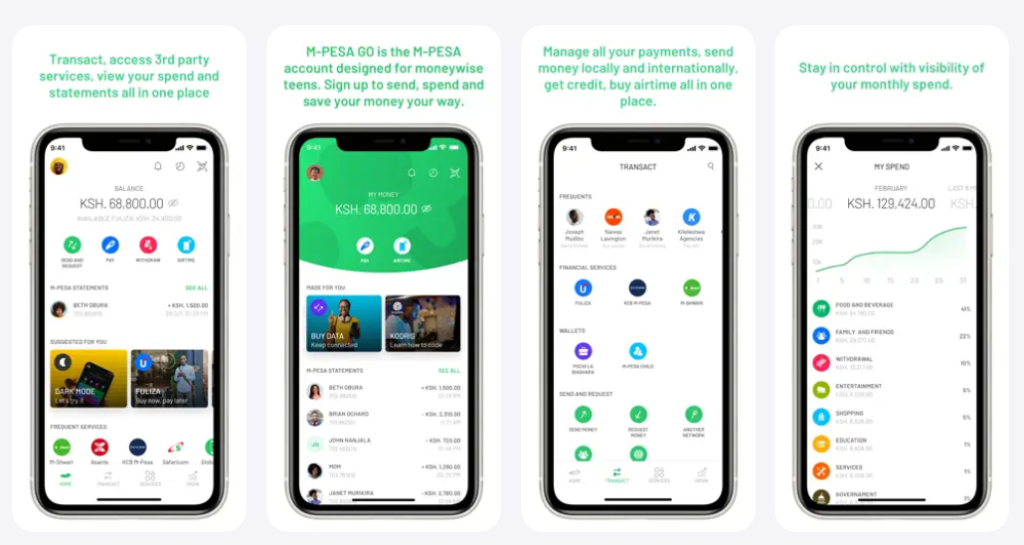
If you are a first-time user, you will see a prompt to Activate HELB Services that requires you to accept Safaricom’s data-sharing terms under Kenya’s Data Protection Act. Proceed and complete the biometric verification process, which requires you to provide your national ID number and verify it. You can follow the rest of the prompts as guided by the system to get the HELB mini app up and running on your smartphone.
How to Withdraw HELB Funds via M-Pesa
The same methods that you used for registration for the disbursement M-Pesa process can also be used to withdraw funds directly to your M-Pesa number. Here is how:

USSD Method (*642#)
Follow these steps to withdraw using USSD:
- Dial *642# on your phone
- Wait for the menu to load and provide your M-Pesa PIN if requested
- Next, select the option for Upkeep Withdrawals
- Proceed to specify the type of withdrawal (i.e., full amount or partial) and enter the amount you want to withdraw
- Confirm the transaction with your M-Pesa PIN
M-Pesa Super App Method
The process is as follows:
- Open the M-Pesa app
- Go to the “Services” section
- Tap on “Education”
- Select “HELB”
- Follow the prompts to withdraw your funds
M-Pesa Withdrawal Charges for HELB Funds
Both methods described above will allow you to withdraw funds directly to your M-Pesa account. However, while doing so, you need to be aware of the M-Pesa withdrawal charges for different amounts. HELB usually disburses funds to students between a minimum of KSh 40,000 and a maximum of KSh 60,000.
To find out about the HELB M-Pesa charges in 2026, you can use the M-Pesa charges calculator below:
Tracking HELB Disbursement Status
Did you know you can also track down your HELB disbursement status? While there are various methods you can use for me, the technique that has personally worked in the past is to use the HELB student portal account directly.
All you need to do is log in to your account, and while in your dashboard, navigate to the “My Loans” section. Here, you’ll find a breakdown of your disbursement history, including batch numbers, payment dates, and amounts disbursed.
Still, the* 642 # USSD code is also available for those who want to check their HELB status via SMS.
Questions And Answers
How do I check my HELB loan balance via SMS?
Follow these steps:
You will need to register to check the HELB loan balance via SMS. First, send REGISTER#ID No (e.g., REGISTER#12345678) to 5122 to register. Then, to see your balance, send an SMS with FirstName#ID No (e.g., JOHN#12345678) to 5122.
How do I find out my HELB disbursement date?
For real-time updates, check the HELB Student Portal (portal.hef.co.ke) or dial *642#.
Can HELB send money directly to M-Pesa?
Yes! Since 2023, HELB disburses upkeep funds directly to M-Pesa via the HELB Mini App (under “Services” in the M-Pesa Super App) or USSD code *642#


