


It’s no secret that Safaricom is the leading mobile operator in Kenya, currently commanding approximately 63.3% of the mobile market share as of 2026, with Airtel Kenya holding 32.2% and Telkom capturing the remaining portion. But all these numbers matter because, at the end of the day, using a Safaricom SIM Card or number, we can communicate with our family, friends, and even professional colleagues. However, there are times when you can miss calls, which can disrupt the flow of essential information, whether it’s an emergency or a business deal. This is where the concept of “you attempted to call me” was born, which notifies you when your phone is out of reach while you are being called.
How do you activate Safaricom’s missed call feature on your number? In this guide, you will learn the official method provided by Safaricom for doing this yourself. So make sure to read the article to the end to get it right.
What Is the You Attempted to Call Me Service?
By now, it’s clear what the “you attempted to call me” service is really, but for those who are not yet aware, in the simplest way possible, it’s a Safaricom automated SMS service that leaves you a message when someone tries to call you, but your phone is switched off, out of network coverage, or unreachable.
The service works through conditional call forwarding technology. When your phone is unreachable, Safaricom automatically redirects incoming call attempts to its central voicemail and alert number (0722199199). This redirection triggers the system to send you an SMS alert with details about who tried to call and when.
More Read

When activated, the beauty of the service is that as soon as the person you recently tried to call joins the network, both the caller and the recipient will receive an instant SMS alert informing them that the person you tried to call is online or that someone tried to call you.
How to Activate the Service in 2026
The process of activating the missed call alert on your Safaricom number is relatively easy, as long as you follow the steps below.

Method 1: Direct Activation Code (Fastest Method)
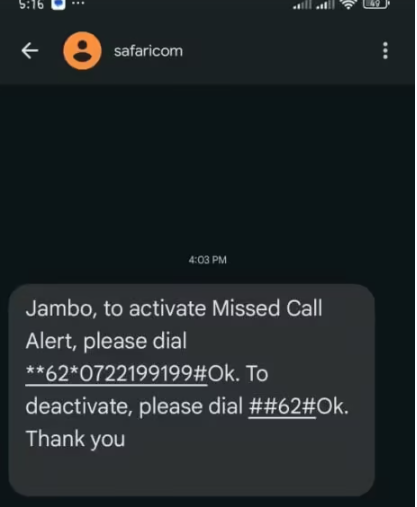
The quickest way to activate your missed call alert service is to dial the following code directly:
Dial **62*0722199199# on your phone and press the call button. You will know the activation is successful when you receive a confirmation message indicating that call forwarding was successful.
This code sets up conditional call forwarding when your phone is unreachable, directing calls to Safaricom’s notification system, which then sends you SMS alerts.

Method 2: Using the USSD
If you prefer using the menu system or want to explore additional options, follow these steps:
Dial *100# on your phone and press the call button. On the present menu, choose option 3, marked as “Products and Services.” Next, select option 8, which is “Voicemail.” Then choose the option marked “Missed Call Alert.” On the menu, you can choose option 1, “What is a missed call alert?” to learn about the service, or option 2, “How to activate or deactivate?” to get instructions for activating it.
After you choose option 2, you will receive an SMS on your number with instructions to activate it. Now, to activate your attempted call to me service on your phone, retrieve the SMS sent to your number, which instructs you to dial **62*0722199199# and press Ok. You will know it’s successful if you get another message indicating that call forwarding was successful.
How to Deactivate the Service
If you no longer want to receive missed call alerts, deactivating the service is straightforward:
Dial ##62# on your phone and press the call button. This code cancels the “when unreachable” call forwarding setting, effectively turning off the missed call alert service. You should receive a confirmation message indicating that the deactivation was successful.
FAQs
How do you activate Safaricom when you attempt to call me?
Dial **62*0722199199# then press Ok, and wait for a success confirmation message.
How to deactivate the missed call alert service?
Dial ##62# and press Ok to cancel the call forwarding and stop receiving missed call alerts.
How to activate call barring in Safaricom?
Dial 330000# to activate call barring services on your Safaricom line.
How to activate call waiting in Safaricom?
Dial *43# and press Ok to activate call waiting service on your number.