


If you are reading this guide, you are likely looking to use your Kenya Revenue Authority (KRA) PIN. Having these unique PIN identifiers is crucial not just for filing taxes but also for other transactions, including opening bank accounts, transferring motor vehicles, and applying for HELB loans. Therefore, if you find yourself in a situation where you have forgotten your KRA PIN? Well, this doesn’t have to sound any alarm bells, as you can still easily retrieve it online.
Over the years, the Kenya Revenue Authority has made it easier for anyone to verify or retrieve their PIN, whether it is misplaced or forgotten, through its Itax portal. For some, it’s actually easier to follow the process; for those who are not well-versed in the how-tos involved, this guide is specifically for you.
I’ll cover everything with the simplest explanations to ensure you have your KRA PIN Number by the end of the day. So, let’s get started and retrieve your KRA PIN.
What is a KRA PIN?
I really don’t want to get into the details of a KRA PIN, since I believe many of us already have one. But if you don’t have one, it is simply an 11-digit personal identification number issued to every individual taxpayer aged 18 or older.

This PIN is usually given to both individuals and businesses. For individuals, the KRA PIN starts with “A0…”, while for companies it begins with “P0…”. Below, I have attached a sample KRA PIN certificate image, which shows the rightful location of the KRA PIN on the certificate:
How to Retrieve Your KRA PIN Using ID Number
The process of retrieving your KRA PIN online, even if you’ve misplaced it, is remarkably simple. You can easily complete it using just your smartphone and the KRA tax portal, which is the same portal you used for your initial KRA PIN registration. Here’s a straightforward guide to help you:

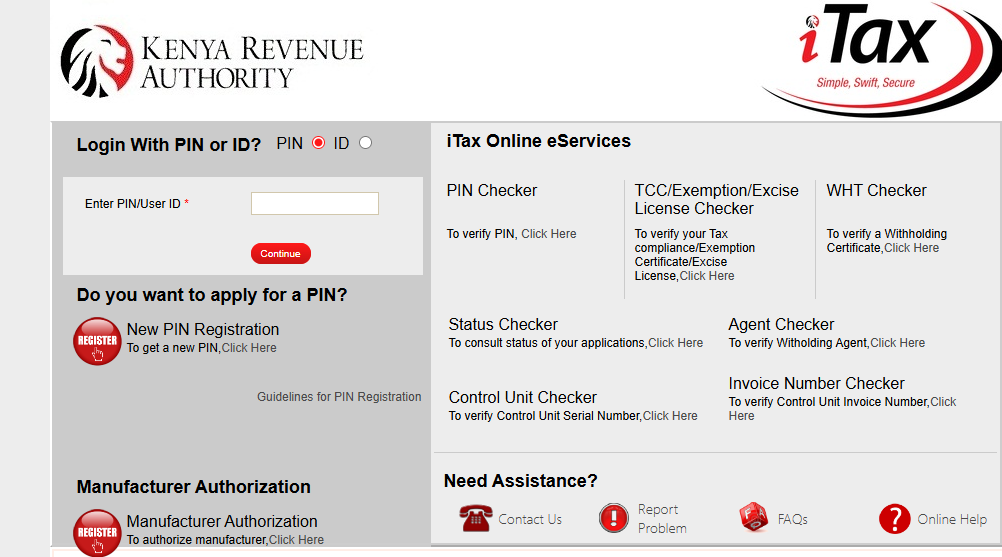
- Visit the official KRA tax portal at https://itax.kra.go.ke/
- Proceed to log in using your credentials. If you have forgotten your password, click on the unlock password link and follow the prompts to create a new one.
- Once you are in, navigate to the “Registration” Tab and click on “Reprinting PIN certificate” in the drop-down Menu bar.
- On the redirected page, under Applicant Type, please select one of the two options (Agent or Taxpayer) from the drop-down menu, then submit.
- Once you hit the Submit button, you will receive a prompt message asking you to confirm whether you really want to submit the application. If you do so, you will receive a notification stating that the PIN Certificate has been generated successfully, along with a link to download it on your phone or computer. Open the document; it will include your KRA PIN.
Alternative Ways to Retrieve Your KRA PIN
In addition to using the iTax portal, KRA offers several other convenient methods to retrieve your PIN if you’re unable to access the portal or prefer alternative channels. These options ensure that you can recover your PIN regardless of your circumstances.
Contact KRA Call Centre
You can call the KRA call centre at +254 711 099 999 or +254 20 4 999 999 between 7 AM and 9 PM, Monday to Friday. Once connected, press 2 to retrieve the PIN, then follow the automated instructions. The system will guide you through the verification process using your ID number.
Email Request
Send a PIN retrieval request to callcentre@kra.go.ke. In your email, attach a clear, colored scanned copy of both sides of your national ID card. Include your full name and ID number in the email subject line for faster processing. KRA typically responds within 24-48 hours with your PIN certificate.

Social Media Channels
Reach out to KRA through their official social media platforms including WhatsApp, Facebook, Twitter (X), or Instagram. Send a direct message with your request, providing your ID number and personal details for verification. Ensure you’re contacting the verified official KRA accounts for security purposes.
Visit a KRA Office or Huduma Centre
You can physically visit the nearest KRA service centre or any Huduma Centre across Kenya. Carry your original national ID card and request PIN retrieval services at the customer service desk. An officer will assist you, and you’ll receive a printed copy of your PIN certificate immediately.
Check Your Email
If you registered your PIN recently, check the email address you used during registration. The iTax system automatically sends a copy of the PIN certificate to your registered email after the first-time registration. Don’t forget to check your spam or junk folder as well.
KRA PIN Checker
Now that you have the KRA PIN, can you verify in real time whether it is active? Still, on the same KRA iTax portal, you will be glad to know that the Authority provides a reliable KRA PIN checker tool that allows you to check the status of your PIN. Here is how:
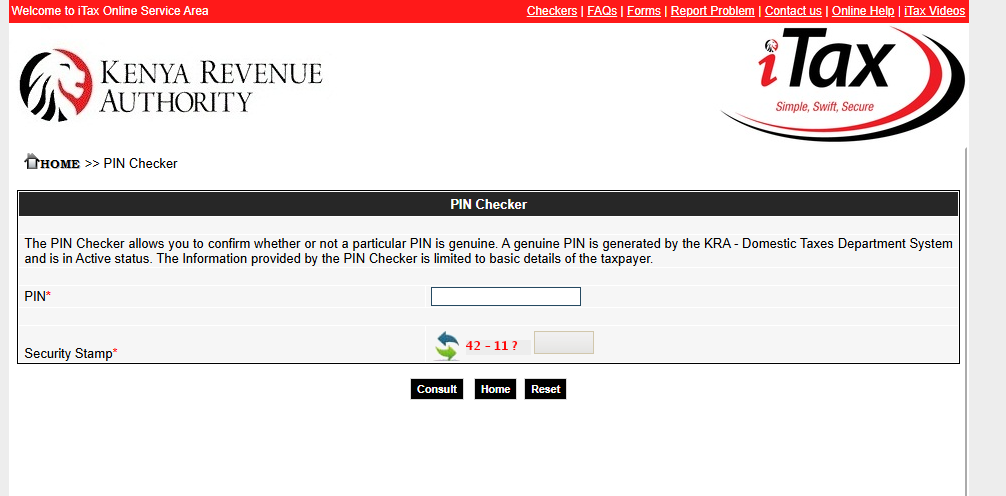
- Visit the PIN checker tool using the link https://itax.kra.go.ke/KRA-Portal/pinChecker.htm
- You will see two Input boxes. The first will require you to enter your PIN, while the second will require you to fill in the Security Stamp Question.
- Once done, just hit the Consult button, and you will be able to see the name of the person the PIN belongs to, the current state, the PIN status, and the date of registration, as shown in the image below.
KRA Contacts
If you need extra assistance from KRA, we have a wonderful customer support team available to you at any time of day. Just reach out to them directly using the details below:
- Website Support: https://www.kra.go.ke/contact-us
- Call: +254 20 4 999 999 or +254 711 099 999
- Email: callcentre@kra.go.ke
- Address: Times Tower Building, Haile Selassie Avenue, P. O. Box: 48240 – 00100
FAQs
How to check KRA PIN using ID number?
To check your KRA PIN using your ID number, visit the KRA iTax portal at https://itax.kra.go.ke/, log in with your credentials, navigate to the Registration Tab, and select “Reprint PIN certificate.”
What is the USSD code for KRA PIN?
The USSD code for KRA PIN retrieval is *222#. Dial *222# on your mobile phone, select option 5 for “KRA Services,” then choose option 3 for “PIN Retrieval,” specify your taxpayer type (Kenyan, Non-Kenyan, or Business), and enter your National ID number.
Is there an app to check my KRA PIN?
Yes, KRA offers the KRA M-Service mobile app available for Android devices that allows you to check your PIN, verify PIN details, and access various tax services.
Where can I find a reliable KRA PIN checker?
The official and most reliable KRA PIN checker is located at https://itax.kra.go.ke/KRA-Portal/pinChecker.htm