

For those who may not know, NTSA motor vehicle searches are no longer done via the TIMS portal but through the eCitizen platform. The eCitizen portal is a government of Kenya database that houses all government services, including NTSA services such as vehicle registration, inspection, license renewal, and motor vehicle search.
When buying a vehicle in Kenya, especially if it’s secondhand, you would want to know its various details, such as whether it has been involved in an accident in the past, if it’s damaged, whether there are any outstanding liens or encumbrances, its insurance history, and verification of ownership authenticity. These are details that can protect you from fraud and expensive legal disputes down the line.
In these situations, the process of motor vehicle search becomes very important and can potentially save you from costly mistakes or legal complications. The National Transport and Safety Authority (NTSA) records every vehicle on Kenyan roads, making it easier for anyone to retrieve information about a vehicle online at a fee of KSh 550. If you are just getting started and don’t know where to look, don’t worry, this comprehensive guide has all the answers to all your questions about the NTSA vehicle search.
What Information Does a Motor Vehicle Search Reveal?
The motor vehicle copy of records document typically contains comprehensive details, including the vehicle’s registration history, previous ownership records, any recorded accidents or insurance claims, outstanding financial obligations, technical specifications, and current registration status.

This information proves invaluable when making informed decisions about vehicle purchases or verifying the legitimacy of vehicles already in your possession.
Requirements For Motor Vehicle Search
Before you start the motor vehicle search process, there are a few things you need to ensure you have met. They are as follows:
- You need to be a Kenyan citizen over 18.
- You must ensure that you are registered on the eCitizen portal.
- You must be willing to pay a motor vehicle search fee of KSh 550.
- The vehicle registration number (number plate) or chassis number of the vehicle you want to search.
- A stable internet connection and access to a device capable of downloading PDF documents, as your search results will be provided in this format.
- Your M-Pesa number or alternative payment method for completing the transaction.
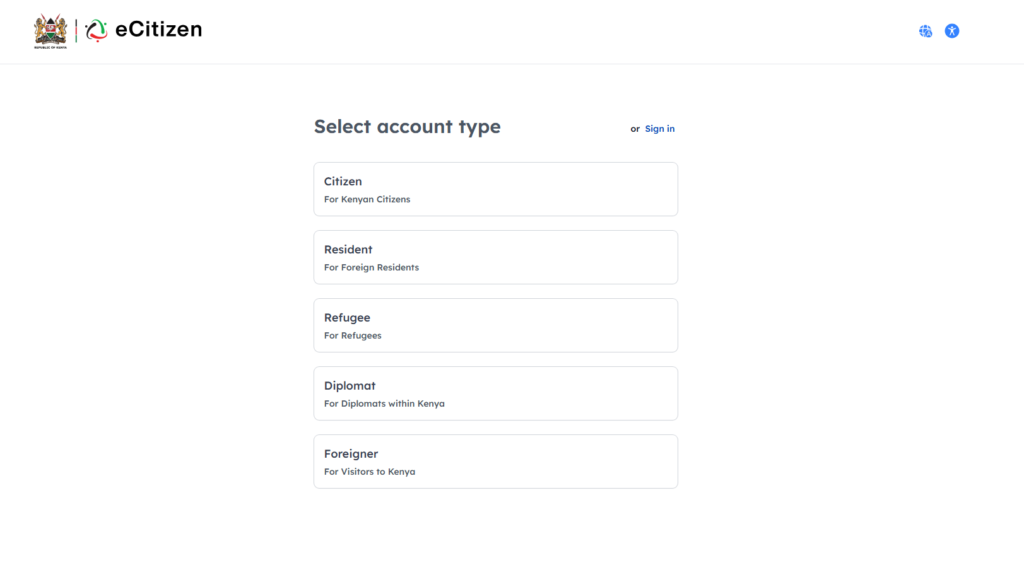
With these requirements, you can proceed with the process. For those not registered on the eCitizen portal, the process can be done within minutes and is surprisingly straightforward. All you need to do is visit the website registration link at https://accounts.ecitizen.go.ke/en/register, choose your registration type, specifically “Citizen — For Kenyan Citizens,” fill out the application form with accurate information, activate your account through the verification email sent to your registered email address, and then log in with your newly created credentials.
How To Do A Motor Vehicle Search in Kenya
Once registered on the portal, the rest of the process becomes more manageable, given that you are familiar with the requirements we have listed above. If the process seems somewhat complex at first glance, below are the detailed steps to follow:
Step 1: Accessing the NTSA Portal Directly on eCitizen
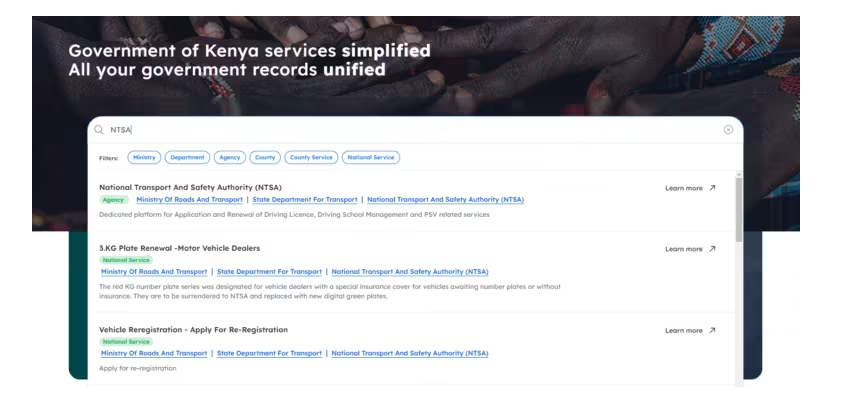
If you are logged in to the eCitizen website homepage, a prominently displayed search bar is displayed. Just type in “NTSA” and hit the first link that appears for NTSA services. You will be redirected to the comprehensive NTSA list of services available on the platform. Now, to access the NTSA portal within eCitizen, there is another search bar where you must type “Online Search-Copy of Vehicle Register Record“ and tap on the link that appears. You will be immediately logged into the NTSA portal section on eCitizen, where all vehicle-related services are centralized for your convenience.
Step 2: Accessing Motor Vehicle Copy of Records Service
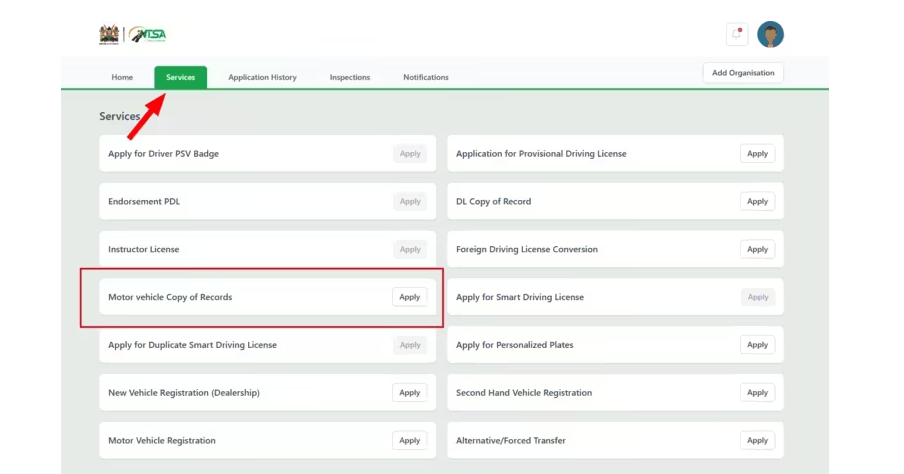
Once logged in on your homepage, you can see various available services, including your driving license details and other personal information. However, don’t be distracted by all the other options available. For our specific purpose, navigate to the “Services” tab and click on it. Once the page loads, you will see several services offered by NTSA, but since we are interested in motor vehicle search specifically, go to the first column of the service section in row number four and click the “Apply” button just beside the “Motor Vehicle Copy of Records” option.
Step 3: Entering Vehicle Information and Initiating Search
This step is where accuracy becomes crucial for successful results. After accessing the copy of records service, as covered in the previous step, the next interface will prompt you to provide specific vehicle identification details. In this particular step, you need to provide either the vehicle registration number (number plate) or the chassis number. Both pieces of information are acceptable, but the registration number is typically easier to obtain and verify.
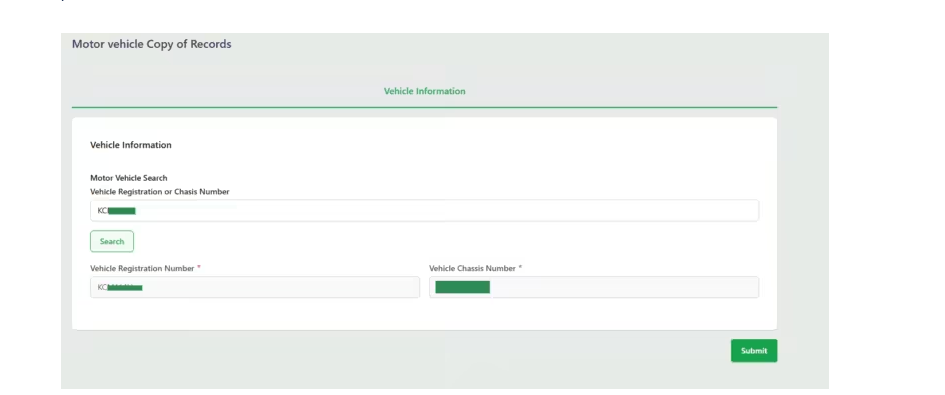
Type the information carefully, double-checking for any typos or incorrect characters, as errors at this stage will result in failed searches and potential delays. Once you’ve entered the information, click on “Search” to verify the vehicle exists in the system, and then click “Submit” to proceed to the payment phase.
Step 4: Complete Payment Process
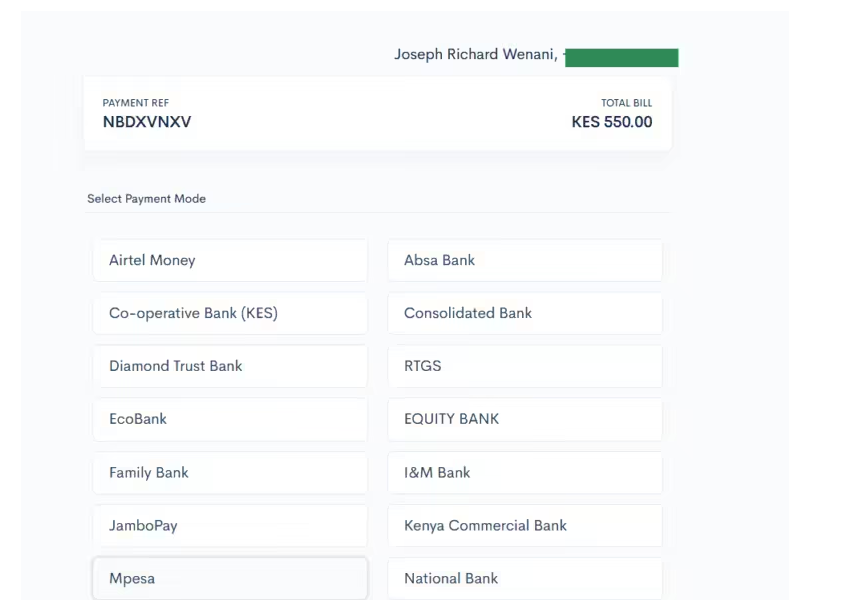
The payment phase represents the final step before accessing your vehicle information. The amount payable for a motor vehicle search through the eCitizen platform is Ksh 550, which represents excellent value considering the comprehensive information provided. The best part about the payment system is that multiple options are provided to accommodate different user preferences and banking relationships.
Step 5: Download the Motor Vehicle Copy of Records
The final step involves downloading your own copy of the comprehensive vehicle records. The copy of records is a detailed PDF document that contains extensive information about the particular vehicle you searched, based on the registration or chassis number you provided.
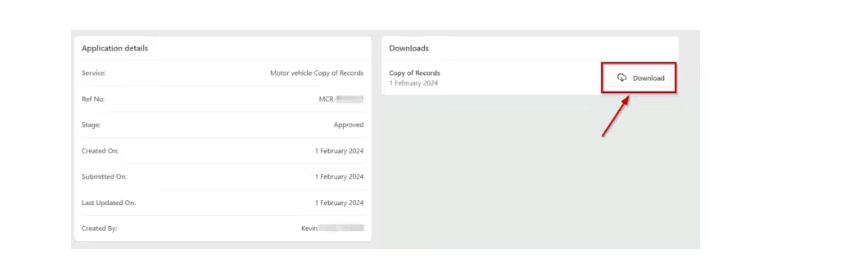
To download the records, look at the top right section of the portal interface, where you will see a prominently displayed “Download“ button. Simply click on it, and a PDF document will be automatically saved to your device’s default download location.
How to Read and Understand Your Motor Vehicle Copy of Records
Once you have downloaded the Copy of Records PDF, understanding what each section means will help you make a confident and informed decision, especially when buying a secondhand vehicle. The document is organized into several key sections:
- Vehicle Identification Details — Confirms the vehicle’s make, model, year of manufacture, engine number, chassis number, and registered body colour. Cross-check these details against the physical vehicle and its logbook. Any discrepancy here is a serious red flag.
- Ownership History — Shows the current registered owner and any previous owners. Multiple ownership transfers in a short period can indicate underlying problems with the vehicle that prompted previous owners to sell quickly.
- Registration Status — Confirms whether the vehicle’s registration is active, expired, or suspended. A vehicle with an expired or suspended registration cannot legally operate on Kenyan roads until the issue is resolved.
- Encumbrances and Financial Obligations — One of the most critical sections for buyers. It reveals whether the vehicle has any outstanding loans, liens, or other financial obligations. If you purchase a vehicle with an unresolved encumbrance, you may inherit the debt.
- Insurance Status — Shows whether the vehicle has active insurance coverage. A long history of uninsured periods may indicate a negligent previous owner.
- Inspection Records — Reflects whether the vehicle has been presented for the mandatory NTSA inspection. Gaps in the inspection record can indicate the vehicle was operated illegally or was off the road during those periods.
If any of the details in the Copy of Records contradict what the seller has told you, or if sections appear blank where they should have data, treat this as cause for further investigation before completing the purchase.
Frequently Asked Questions
How much does a motor vehicle search cost in Kenya?
The official fee for a motor vehicle search through the eCitizen portal is KSh 550. This is the only legitimate and authorised channel for conducting a motor vehicle search in Kenya. Any platform charging a different amount is not an official NTSA-approved service.
How long does the motor vehicle search process take?
The motor vehicle search process takes less than 5 minutes from start to finish, as long as you are registered on the eCitizen portal and have paid the access fee. The PDF document is generated and available for download almost immediately after payment is confirmed.
Do I need a driver’s licence to do a motor vehicle search on eCitizen?
No. A driver’s licence is not required to conduct a motor vehicle search on eCitizen. All you need is a registered eCitizen account, the vehicle’s registration number or chassis number, and the KSh 550 search fee.