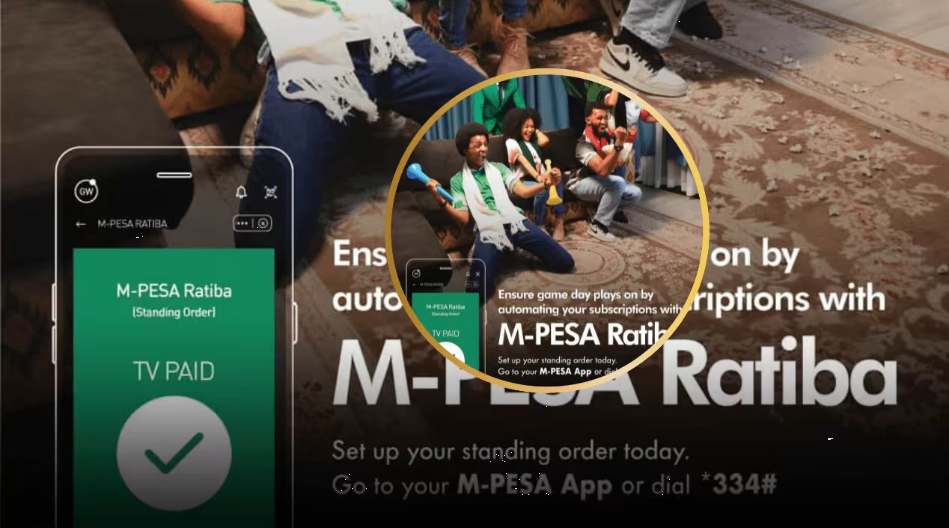

M-PESA by Safaricom has been a quick game-changer since it launched in early 2007. To date, the service keeps on innovating by introducing a new set of features, such as the M-PESA Ratiba, designed to automate payments. This has closed the gap between the banking sector and mobile money solutions, especially for people who rely on M-PESA for various transactions.
For those who might not be conversant with exactly what the M-PESA Ratiba tool is, it is just a tool within the M-PESA App that allows you to easily schedule recurring bills for future payments directly from your M-PESA outstanding balance to other users. You can schedule automatic transfers to others daily, weekly, monthly, or even annually. This service can be best used for paying bills, rent, or even school fees for your children, among many others.
What exactly is M-PESA Ratiba? M-PESA Ratiba is Kenya’s first mobile money standing order feature that enables users to set up recurring payments directly from their M-PESA wallets. Launched in October 2024, this innovative service allows seamless and automatic payments of recurring transactions and bills without manual intervention each time.
Why Use The M-PESA Ratiba?
There are quite many reasons why you should consider enrolling in the M-PESA Ratiba feature. First, a huge benefit that it offers is time-saving, meaning that you do not need to make manual payments every month. The Ratiba service will do that for you, given that you have scheduled automatic payments from your wallet for a given time duration (daily, weekly, monthly, and so on).

Also, if your wallet has insufficient balance, you will not be charged for unsuccessful or cancelled standing orders, which promotes healthy financial security. The customer will not be penalized for failed standing orders occurring because of insufficient funds in their M-PESA wallets. Furthermore, the service supports total transparency for those who prefer to use the My Reminder feature. You will be notified of upcoming payments and easily manage your subscriptions manually.
M-PESA Ratiba Charges and Limits
If you are planning to use the M-PESA Ratiba, then you ought to know there are charges that you need to know. There will be a standard M-PESA Ratiba charge of KSh 5 per transaction (send money, Paybill, Lipa na M-PESA) above the normal M-PESA transaction charges. This means you’ll pay the regular M-PESA fees plus an additional KSh 5 for each automated transaction.

Otherwise, apart from the fees involved, the normal Transaction Limits for M-Pesa apply as follows:
- Regular M-PESA transaction limits of KSh 250,000 per transaction and KSh 500,000 per day shall apply
- M-PESA users can now hold up to KSh 500,000 in their mobile wallet
- There is currently no limit on how many standing orders one can schedule
M-PESA Ratiba vs Traditional Bank Standing Orders
Many Kenyans already use traditional bank standing orders to automate recurring payments such as rent, loan repayments, and utility bills. M-PESA Ratiba serves a similar purpose but operates entirely within your mobile money wallet, making it significantly more accessible — especially for the millions of Kenyans who are underbanked or unbanked.
Here is how the two compare:

| Feature | M-PESA Ratiba | Bank Standing Order |
|---|---|---|
| Setup requirement | M-PESA account only | Bank account required |
| Setup method | M-PESA App or USSD *334# | Visit branch or internet banking |
| Transaction fee | KSh 5 extra per transaction (plus standard M-PESA charges) | Varies by bank; typically KSh 50–200 per transaction |
| Failed payment penalty | No penalty for insufficient funds | Banks may charge a failed debit fee |
| Wallet/account limit | KSh 500,000 (M-PESA wallet) | Depends on bank account type |
| Supported payment types | Send Money, Paybill, Buy Goods | Bank transfers, standing charges |
| Setup time | Under 5 minutes via app or USSD | 1–3 business days |
| Internet required | Optional (USSD works offline) | Required for most digital setups |
The most significant advantage M-PESA Ratiba holds over bank standing orders is zero penalty for failed transactions. With most banks, if your account has insufficient funds on the debit date, you will be charged a failed standing order fee. With Ratiba, the transaction simply does not go through — and you pay nothing.
Another key advantage is accessibility. Setting up a bank standing order often requires visiting a branch, filling forms, or navigating internet banking portals. M-PESA Ratiba can be set up in minutes directly from your phone using either the M-PESA App or by simply dialling *334#. For anyone already using M-PESA daily, Ratiba is the most frictionless way to automate recurring payments without needing a bank account at all.
Supported and Unsupported Transaction Types
M-PESA Ratiba currently supports the most common transaction types, but has some limitations you should be aware of:
Supported Transactions:
- Send Money to registered M-PESA users
- Paybill payments (utilities, rent, loans, etc.)
- Buy Goods payments (Lipa Na M-PESA)
Currently Unsupported:
- Purchase of airtime, payments to and from Pochi la Biashara, international money transfers, withdrawal of funds at agent outlets, interoperability services such as sending funds to Airtel and Telkom subscribers
How to Register for M-PESA Ratiba
Safaricom has made registering and setting up the M-PESA Ratiba feature easier. You can actually access it using two methods as covered down below:
Option 1: M-PESA Ratiba Mini App
This option is best suited for those with phones that can access the internet. The process is as follows:
- Download and install the new M-PESA App on your phone (Android or iPhone) and set up your account.
- On the bottom menu, access the service section and search for “Ratiba” in the search bar.
- The M-PESA Ratiba will now open as a mini app within M-PESA. You will then be prompted to enter your M-PESA PIN to start the registration process. Click on Next and finally Opt-in.

Option 2: M-PESA USSD Code
If you lack access to the internet, using the USSD code for M-PESA is a quick alternative. You can easily enter the M-PESA menu by dialling *334# and selecting option 9 marked as “M-PESA Ratiba” and Option 0 to opt in. The final process involves accepting the terms and conditions, providing your PIN for M-PESA, and being set to go. You will then receive an SMS text indicating that you have successfully opted into the service.
How To Create a Standing Order
If you are looking to create a recurring payment transaction, you should know that the service is available in two modes. First, there is the My Subscriptions mode, which allows for automatic transactions, and lastly, there is the My Reminder mode, which allows any user to manually complete transactions after being notified that automatic payment is turned off.
Depending on the mode that you choose, the process of creating a standing order involves following the process below:
- Log in to the Ratiba mini app using your M-PESA PIN on the M-PESA App
- Select the mode you want to proceed with and tap the green cross icon at the bottom right of the mini app.
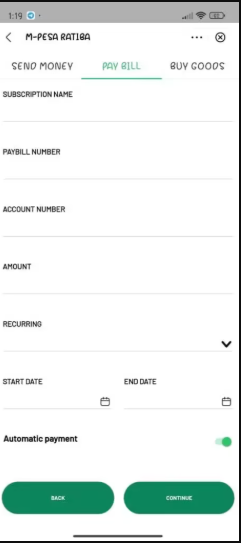
- Proceed to select the type of action or transaction (e.g., Paybill, Buy Goods, or Send Money). Once you do so, you will have to specify the following:
- Subscription Name
- Phone, Paybill, account, and Till numbers, depending on the transaction type
- Frequency of the payments as provided in the drop-down menu (One-off, Daily, weekly, etc.)
- Start and end dates for the payments
- After entering all necessary information, confirm that everything is correct.
- Finally, enter your M-PESA PIN to authenticate and save your standing order details.
How To Opt Out of M-PESA Ratiba
If you have decided to quit using the service, the opting-out process is actually quite as straightforward as the registration process. All you need to do is follow the process below:
- Dial *334#
- Select option 9 to access the service
- Once in, select Option 3 marked as Opt-out and enter your PIN
- You will receive a message from Safaricom confirming you have opted out successfully.
Frequently Asked Questions
What is M-PESA Ratiba?
M-PESA Ratiba is Kenya’s first mobile money standing order feature, launched in October 2024 by Safaricom. It allows M-PESA users to schedule automatic recurring payments — such as rent, bills, or school fees — directly from their M-PESA wallet without needing to make manual transactions each time.
How do I register for M-PESA Ratiba?
You can register for M-PESA Ratiba in two ways: through the M-PESA App by searching for “Ratiba” in the services section and opting in using your PIN, or via USSD by dialling *334#, selecting option 9 (M-PESA Ratiba), and then option 0 to opt in. Both methods take under five minutes to complete.
How much does M-PESA Ratiba charge per transaction?
M-PESA Ratiba charges an additional KSh 5 per automated transaction on top of the standard M-PESA transaction charges that already apply. This means you pay the regular M-PESA send money, Paybill, or Buy Goods fee, plus KSh 5 for the automation itself.
What is the difference between My Subscriptions and My Reminder on Ratiba?
My Subscriptions is the fully automated mode — payments go through automatically on the scheduled date without any action needed from you. My Reminder is a semi-automated mode where you receive a notification when a payment is due, but you complete the transaction manually. My Reminder is useful if you prefer to review payments before they are sent.